
3.6 KiB
In-game debugpy command
This registers an in-game command debugpy which starts the debugpy debugger and listens on port 5678.
For now this is only available for Visual Studio Code (VS Code).
If you are a JetBrains PyCharm user and would like to use this, make some noise at: https://youtrack.jetbrains.com/issue/PY-63403/Support-debugpy
Credit for this goes to Moony on the Evennia Discord getting-help channel, thx Moony! 0xDEADFED5 simply tied a pretty bow around it and stuck it here for everybody else.
Dependencies
This requires VS Code and debugpy, so make sure you're using VS Code. From the venv where you installed Evennia run:
pip install debugpy
Enable the command in Evennia
In your Evennia mygame folder, open up \commands\default_cmdsets.py
add from evennia.contrib.utils.debugpy.cmd import CmdDebugPy somewhere near the top.
in CharacterCmdSet.at_cmdset_creation add this under super().at_cmdset_creation():
self.add(CmdDebugPy)
For a newly initialized game, the result would look like this at the top of the file:
"""
Command sets

All commands in the game must be grouped in a cmdset.  A given command
can be part of any number of cmdsets and cmdsets can be added/removed
and merged onto entities at runtime.

To create new commands to populate the cmdset, see
`commands/command.py`.

This module wraps the default command sets of Evennia; overloads them
to add/remove commands from the default lineup. You can create your
own cmdsets by inheriting from them or directly from `evennia.CmdSet`.

"""

from evennia import default_cmds
from evennia.contrib.utils.debugpy.cmd import CmdDebugPy

class CharacterCmdSet(default_cmds.CharacterCmdSet):
    """
    The `CharacterCmdSet` contains general in-game commands like `look`,
    `get`, etc available on in-game Character objects. It is merged with
    the `AccountCmdSet` when an Account puppets a Character.
    """

    key = "DefaultCharacter"

    def at_cmdset_creation(self):
        """
        Populates the cmdset
        """
        super().at_cmdset_creation()
        #
        # any commands you add below will overload the default ones.
        #
        self.add(CmdDebugPy)
Add "remote attach" option to VS Code debugger
Start VS Code and open your launch.json like this:

Add this to your configuration:
        {
            "name": "Python Debugger: Remote Attach",
            "justMyCode": false,
            "type": "debugpy",
            "request": "attach",
            "connect": {
                "host": "localhost",
                "port": 5678
            },
            "pathMappings": [
                {
                    "localRoot": "${workspaceFolder}",
                    "remoteRoot": "${workspaceFolder}"
                }
            ]
        },
Use localhost for the host if you are running Evennia from the same machine you'll be debugging from. Otherwise, if you want to debug a remote server, change host as necessary.
Afterwards it should look something like this:

(notice the comma between the curly braces)
Use it
Set a breakpoint in VS Code where you want the debugger to stop at.
In Evennia run debugpy command.
You should see "Waiting for debugger attach..."
Back in VS Code attach the debugger:
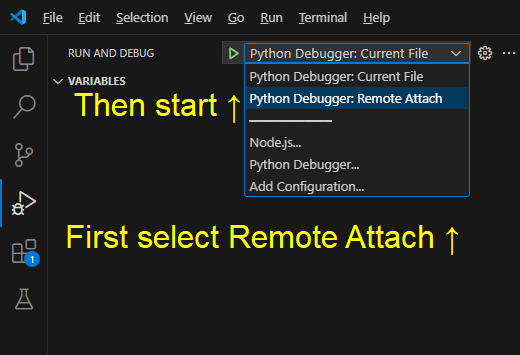
Back in Evennia you should see "Debugger attached."
Now trigger the breakpoint you set and you'll be using a nice graphical debugger.